Guilt-Free Screen Time

Love your phone? Good. Complete your morning routine, then scroll guilt-free. Anchor makes your favorite apps the reward for following through.

No willpower required. Anchors give you somewhere to go - the rest usually follows.

Join the Beta
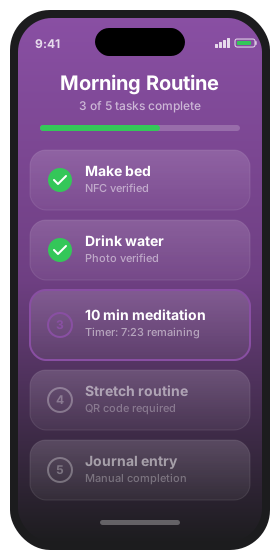
Anchor app on iPhone

The Guilt-Free Promise

Stop fighting your phone. Start using it as motivation.

The Guilt Trap

  • Endless screen time limits that you ignore
  • Feeling bad every time you pick up your phone
  • Apps that shame you for "too much" usage
  • Fighting your phone instead of using it

The Anchor Way

  • Complete routines, unlock your apps - simple as that
  • Enjoy TikTok, Instagram, games without guilt
  • Your phone becomes motivation, not the enemy
  • Feel accomplished before you even start scrolling

How You Earn It

Simple tools that turn your phone into motivation

Sequential Routines

Ordered tasks that build consistency. Complete each step before moving to the next.

Verified Completion

NFC tags, QR codes, countdown timers, and photo verification ensure you actually did it.

App Blocking

Your favorite apps unlock automatically when you finish your routine.

Smart Triggers

Try to open Instagram before your morning routine? Anchor gently redirects you to earn it first.

Achievements

Build streaks and celebrate your consistency - then reward yourself with guilt-free scroll time.

Live Activities

Track your progress right from the Lock Screen and widgets.

How It Works

Three steps to guilt-free phone time

1

Create Your Routine

Build a sequence of tasks for your morning, workout, bedtime, or any habit you want to establish.

2

Set Your Triggers

Choose when routines start, and place your anchors where tasks happen. Put the anchor in the closet, not on your nightstand.

3

Walk There & Unlock

Go to your anchors, tap, and your favorite apps unlock. That's it - you showed up for yourself.

Place Your Anchors

Physical destinations that pull you toward action

We call them Anchors - NFC tags and QR codes you place where tasks happen. They're not surveillance. They're destinations. Sometimes just getting there is the hard part.

NFC Anchors

Place an anchor in your closet, bathroom, or wherever the task happens. Walk there, tap, and the rest usually follows.

Most Popular

QR Anchors

Print free anchors for anywhere - your gym bag, office desk, or kitchen. A destination you can reach.

Free

Countdown Timer

Set a minimum time for tasks like meditation or reading. Timer ensures you complete the full duration.

Time-Based

Photo Verification

Snap a photo as proof of completion. Great for cleaning, cooking, or visual tasks.

Visual Proof

Why Anchors Work

The hardest part is starting

Reminders tell you what to do. Anchors give you somewhere to go.

There's a difference between "I should get dressed" and "I need to walk to my closet." One is a mental battle. The other is just movement.

Place an anchor where the task happens - inside the closet, not on the nightstand. When your routine starts, you have a destination. Walk there, tap, and the rest usually follows.

That's why your screen time feels guilt-free. You didn't just check a box. You showed up.

Some days are harder than others. Anchors don't judge - they just give you a place to go. That's often enough.
Frequently Asked Questions

Everything you need to know about Anchor

Reminders tell you what to do. Anchors give you somewhere to go. There's a big difference. "Get dressed" is a mental battle. "Walk to the closet and tap" is just movement. Once you're there, getting dressed becomes obvious. Anchors turn tasks into destinations.

Not at all! We love our phones too. Anchor isn't about reducing screen time - it's about making your screen time feel earned and enjoyable. Do what matters to you, then scroll without the guilt.

When you set up a routine, you choose which apps to "lock" behind it. These apps stay locked until you complete your tasks - then they unlock automatically. Think of it as earning your screen time rather than having it taken away.

NFC tags are inexpensive and widely available. You can find packs of 10-50 tags on Amazon for under $15. Any NTAG213 or NTAG215 compatible tag will work. They're small, waterproof stickers you can place anywhere.

Yes. Your routines, habits, and completion data stay on your device. Anchor doesn't require an account and doesn't send your personal habit data to any servers. What you do with your time is your business.

The blocking is enforced by iOS Screen Time, which is designed to be difficult to bypass. While there's always an emergency override (you're an adult after all), it requires extra steps that give you time to reconsider. The friction is the feature.

Yes! All core features work offline. Your routines, NFC tags, QR codes, and app blocking function without an internet connection. Anchor is designed to work reliably wherever life takes you.

Anchor requires iOS 17 or later. For NFC tag scanning, you need iPhone 7 or newer. All other features work on any device that supports iOS 17. Live Activities require iPhone 14 Pro or later for the Dynamic Island.